 Snipocket
Snipocket · Redact screenshots
Redact a screenshot before you share it
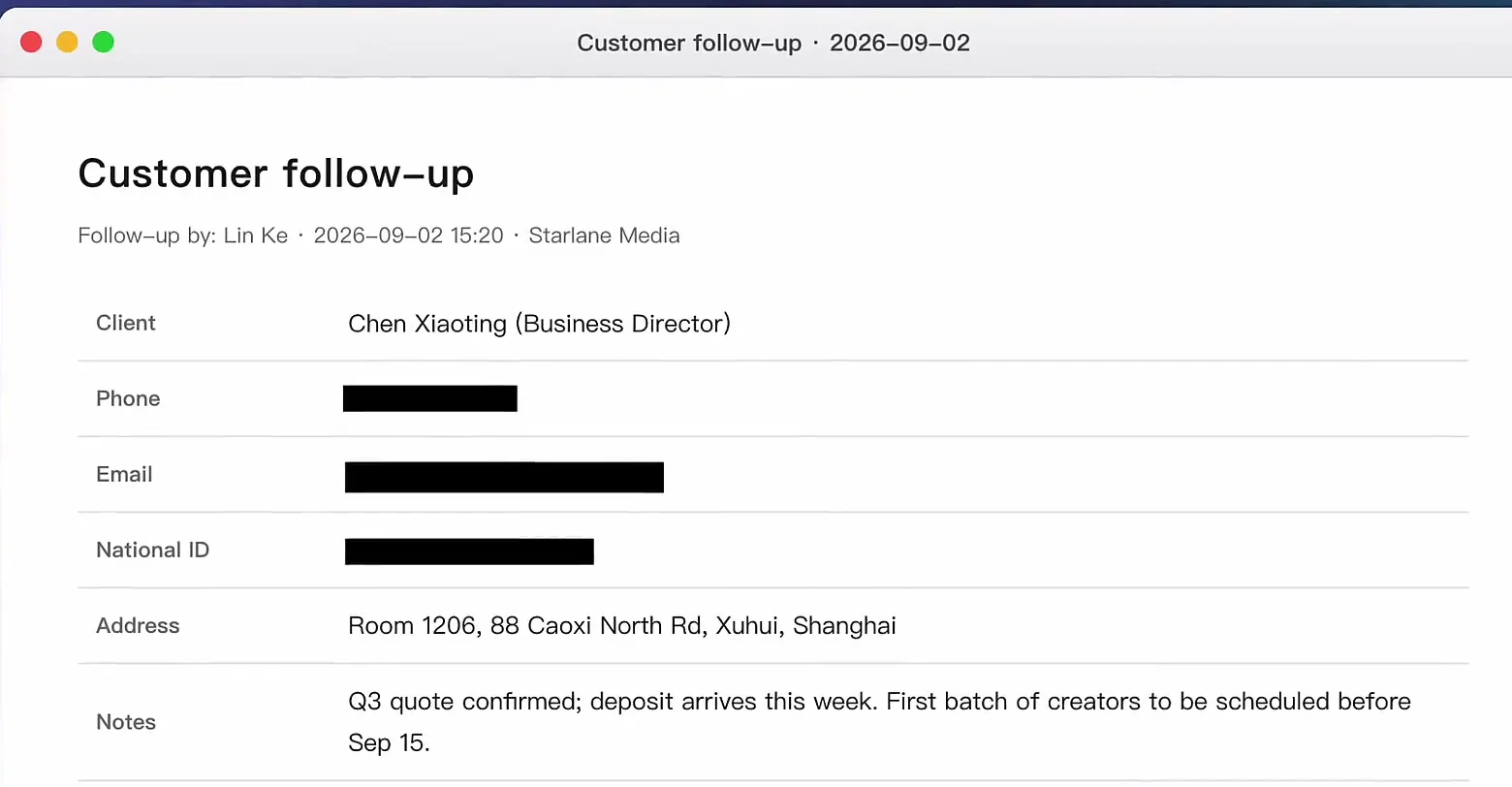
In shortRight-click a screenshot on Snipocket's Shelf and choose “Copy Redacted Copy”. Snipocket reads the image on your computer, covers email addresses, payment card numbers and QR codes with solid black bars, and puts the redacted copy on your clipboard — paste it straight into a chat or email. The original isn't touched. Need to hide something else, like a name or an address? The Mosaic, Blur and Rectangle tools are free.
Core features free forever · Pro free for 7 days · No account · Mac 9.5 MB · Windows 122 MB
Three steps to a safe screenshot
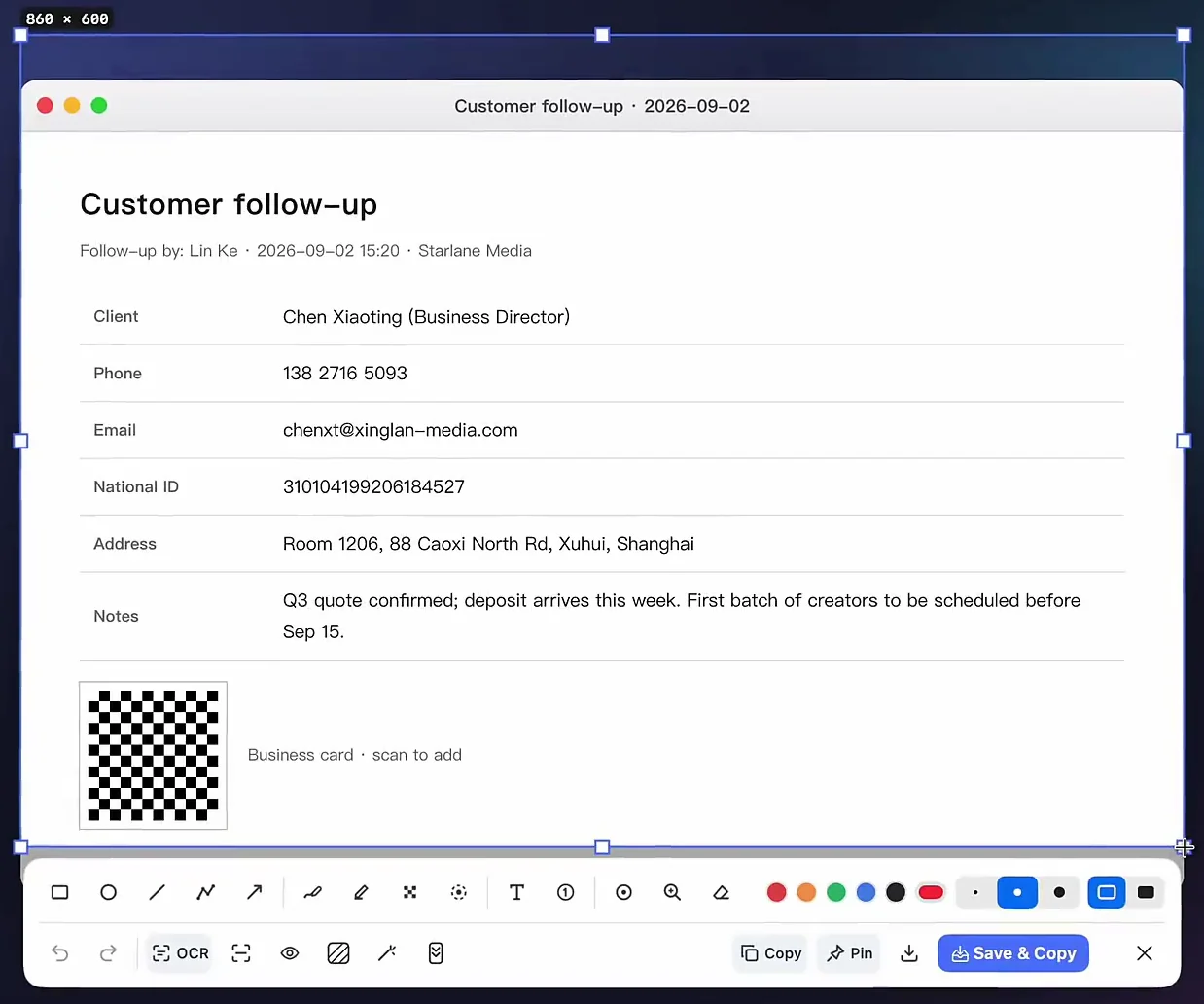
Before and after
What gets detected automatically
- Email addresses
- Payment card numbers — only when they pass the Luhn checksum, so random long numbers aren't masked
- QR codes and barcodes
- Chinese mobile numbers (including spaced or dashed groups) and Chinese ID numbers
Not detected yet: phone numbers in other countries' formats, names, street addresses, licence plates. Cover them by hand with Mosaic, Blur or Rectangle — those tools are free.
Good to know
- Solid black, not blur: automatic redaction uses opaque bars, so the covered text can't be recovered from the copy.
- It reads the image first: very small, blurry, tilted or handwritten text may be missed. The app tells you how many areas it masked — glance before you send.
- Verification codes: a code in a screenshot shows up as a one-click-copy banner at the top of the panel instead of being masked.
- On your computer: recognition and masking run locally; images are never uploaded.
What's free and what's Pro
Free forever
- Screenshots and timed capture
- Manual Mosaic, Blur, Rectangle and the rest of the annotation tools
- Copy and save with no watermark
- Pins
Pro (free 7-day trial, then a one-time purchase)
- Right-click “Copy Redacted Copy”
- One-click redaction in the capture toolbar
- Search by the text inside images
- Text grab and QR scanning
The trial needs no account and nothing is deleted when it ends. Personal is $15 one-time for up to 3 devices — see pricing.
FAQ
Does it detect US or UK phone numbers?
Not yet. Automatic detection covers email addresses, payment card numbers, QR codes and barcodes, plus Chinese mobile and ID numbers. Phone numbers in other countries' formats aren't detected — cover them with the free Mosaic, Blur or Rectangle tools before sharing.
Is the original screenshot changed?
Not with “Copy Redacted Copy”: the masked version goes to your clipboard and the original stays untouched on the Shelf. If you redact inside the capture toolbar and then save, the saved image is the redacted one.
Is anything uploaded?
No. Text recognition, detection and masking all run on your computer; no account and no internet connection are needed.
Will it mask order numbers or amounts by mistake?
Card numbers are only masked when they pass the Luhn checksum, so most random long numbers are left alone. Detection is an assist, not a guarantee — the app tells you how many areas it masked, so take one last look before you send.
Is it free?
Manual Mosaic, Blur and Rectangle are free forever. Automatic detection and “Copy Redacted Copy” are Pro features with a 7-day free trial, then Personal is $15 one-time for up to 3 devices.
Related
Find the screenshot first: search the text inside your screenshots. Coming from another tool? Use Snipocket alongside CleanShot X.
One last look before you send — done for you.
Core features free forever · Pro free for 7 days · One-time purchase · No account